I should have bought RAM last year. Anyone who runs anything at home has said some version of that sentence in 2026. Conventional DRAM contract prices rose 93 to 98 percent in the first quarter of this year alone, according to TrendForce, and they are still climbing, with another 10 to 15 percent forecast for this quarter (TrendForce, 30 September 2026). Graphics cards are worse. TweakTown found the cheapest RTX 5090 in Germany listed at about $5,900 (₹5,61,000), against a list price of about $2,360 (₹2,24,000), converted at 18 October 2026 rates. The AI build-out is buying the memory, and the rest of us get what is left.
My home server has 16 GB, no swap, and runs 23 containers. One of them is Hermes, the agent I talk to all day. The plan was to make that work. This is about the day it did not, and what I changed. Break, learn, fix, monitor.
Break
The symptom has been the same for a while. Every so often the server stops answering. The Unraid dashboard will not load, SSH hangs, and I cannot stop anything because I cannot reach anything. The only way out has been a hard reboot, which is a terrible way to treat a machine that holds your files.
So I asked Hermes to help me set up monitoring, and the first snapshot it read already had an answer in it. The kernel had killed two processes that morning, both at 11:33. Hermes runs on the same box, so I was asking a witness who might also be a suspect. It lined up the kernel’s record against its own logs, and it was the suspect.
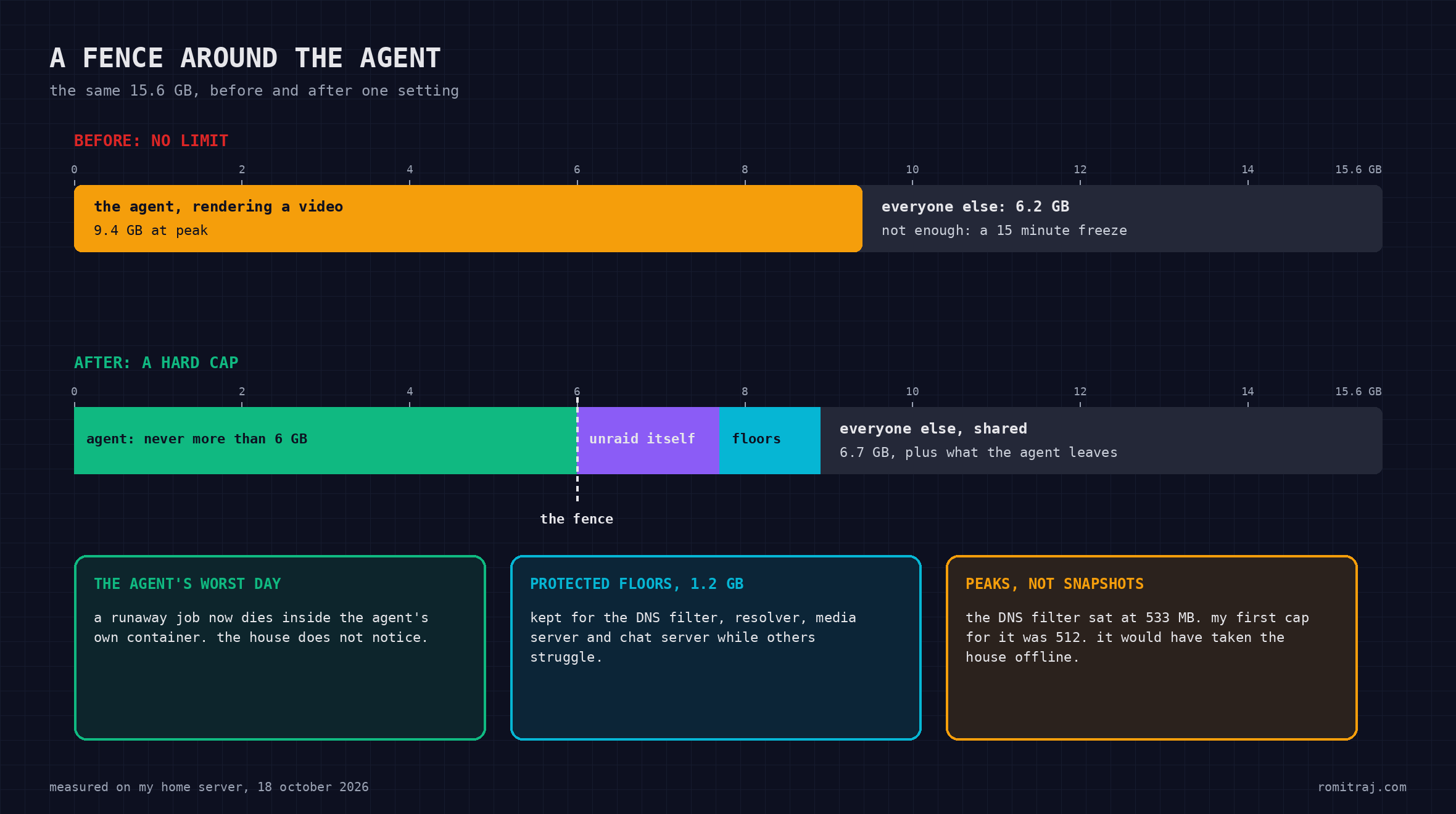
At 11:18, a Hermes session had started rendering an explainer video. The script it wrote ran seven workers in parallel, and each worker drew its own frames and ran its own video encoder. Hermes climbed to 9.4 GB of the machine’s 15.6. Its own log then has a fifteen minute hole, followed by one line: event loop stalled 929 seconds. At 11:33 the kernel’s out-of-memory killer finally acted. It killed my notes app, and then my home automation VM. It did not touch the render, which finished without complaint.
Learn
The machine had not crashed. It was alive and drowning. When Linux runs out of memory and has no swap to spill into, it does not fail fast. It evicts whatever it can, including the code of programs that are still running, then reads that code back from disk a moment later, over and over. The box stays technically up while getting almost nothing done. The dashboard and SSH die because they are programs too, waiting in the same queue as everything else. The kill, when it finally comes, comes late.
The killer does not look for the culprit, either. It scores individual processes, mostly by size. My agent’s load was spread across seven workers, roughly a gigabyte each. The home automation VM was a single process holding 2.1 GB, so to the kernel it looked like the biggest thing in the room. The notes app went first for a different reason: it is built on Chromium, which marks its own processes as the first to sacrifice. Neither of them was the problem. If I wanted the killer to aim, I had to aim it myself.
Then there was a number that looked scarier than it was. On an ordinary afternoon, programs on the server had reserved about 19.4 GB of memory on a machine with 15.6. Linux allows that on purpose, because most programs ask for far more than they ever use. It only bites when enough of them collect at once, which is exactly what seven video encoders do. The answer is not to forbid the reservations. It is to bound what each container can actually spend.
The last lesson I learned by nearly making things worse. My first round of limits came from what the Docker tab showed at that moment, and the tab shows current usage only. The DNS filter for the whole house was sitting at 533 MB, and the cap I first proposed for it was 512. Applying it would have fixed my memory problem by taking the house off the internet. Limits have to come from peaks, and the dashboard does not show you peaks.
Fix
Each container gets three settings. A cap is the most it may ever use; if it hits the cap, the kernel kills something inside that container and nothing outside it. A protected floor is memory the kernel takes from everyone else first, which keeps important services responsive while the rest struggle. A kill order tells the kernel whom to sacrifice when memory truly runs out.
I sorted everything into groups. The DNS filter and resolver get the strongest protection and die last. The media server, the chat server and its database come next. Hermes and the services it relies on sit in the middle, protected but capped. The notes app, the recipes app and the home automation setup go first, and the killable containers are set to restart themselves. The protected floors add up to about 3.5 GB, so they cannot crowd each other out. The caps add up to more than the machine has, which is fine, because they are ceilings and the containers do not all peak at once.
Hermes got its cap the same afternoon: 6 GB, hard. The same render today would be killed inside the agent’s container, and the rest of the house would not notice. The other containers are going in one at a time, because each change restarts the container it touches. Then I fixed the cause. The video pipeline now runs four workers instead of seven, and each encoder gets two threads instead of about two dozen. Renders will take longer, and that is a trade I will take every time.
Monitor
What bothered me most was that I only ever found out by losing access. Now there are three ways to know.
A small watchdog script runs on the server itself and checks memory and CPU every ten seconds. If either stays above 90 percent for a full minute, it posts to a private room on my own Matrix server, with the top processes and containers listed. It talks to the Matrix server directly, as its own small bot account, and deliberately does not go through Hermes. The agent is the most likely cause of a memory spike, so it should not be the only messenger. The script can also stop the biggest container from a list I choose. I have left that switched off until I trust the alerts.
That has an honest limit. The Matrix server lives on the same box, so once the box is fully frozen, nothing on it can tell me anything. For that case, my Mac’s menu bar shows the server’s CPU and memory every thirty seconds and raises a notification if the server stops answering for a minute. It only helps while I am at my desk, which is a gap I have chosen to accept rather than pay a cloud service to close.
The third piece is the one that let Hermes solve this. Every five minutes, a script writes a snapshot of every container’s current and peak memory, its kill count, and the limits actually in force, into a folder the agent can read but cannot change. Hermes gets the numbers without ever getting access to Docker, which on most setups is the same as handing over the whole machine. When something dies, it lines up the kernel’s record of the kill with its own logs. The kernel said what died and when. The agent’s log said what was running at that minute. Two independent records agreeing on the same timestamp is the kind of evidence my old profession would accept.
Where this leaves me
I still wish I had bought RAM last year. More memory would have absorbed this morning’s render, and probably the next few. It would not have told me what happened, it would not have protected the services the house depends on, and it would not have stopped the agent from eventually finding a bigger job to fill the space.
What I have now does those things. The agent runs inside a fence it cannot climb, so its worst day stays its own problem. The kernel kills in an order I chose, instead of picking whatever looks largest. The alerts come from something other than the likely culprit, and when something does go wrong, there is a record that the agent can read and I can check. None of it needed new hardware. It needed peaks instead of snapshots, and an honest list of what in the house actually matters.
That is the whole loop: it broke, I learned why, I fixed the cause and the blast radius, and now I watch it. The next thing to break will probably be something I have not thought of. This time I should hear about it before I lose the dashboard.
Disclosure: this article was researched and drafted with the assistance of AI; every figure was verified against its cited source or measured on my own server, and the published review is the author’s.